
Do You Really Own Your Business Data? What the Microsoft Outage Revealed
By Erin Harris, AI Strategy & Business Transformation Consultant
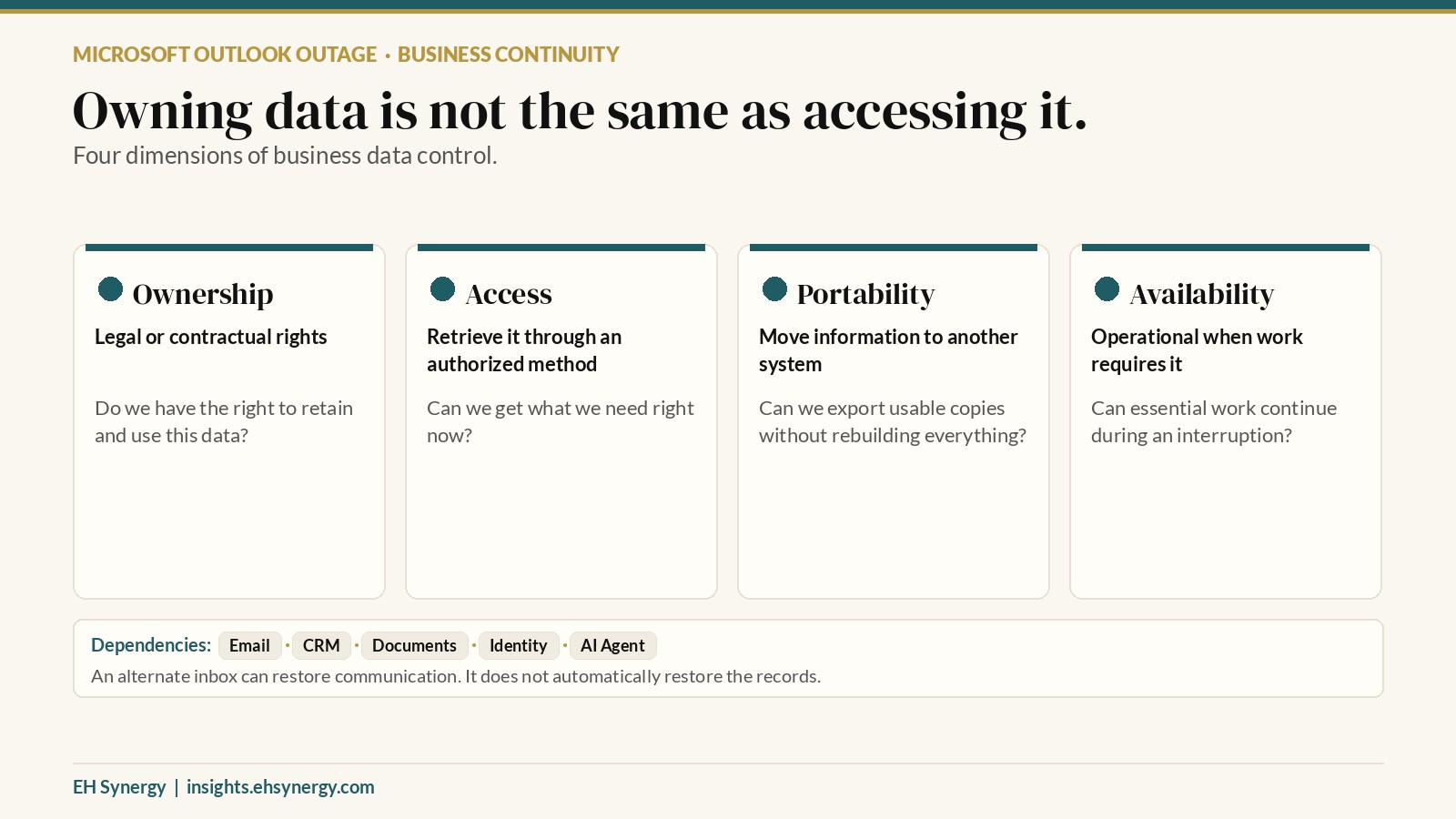
Owning your business data is not the same as being able to access it.
Businesses often assume that paying for software, maintaining an email list, or owning a domain means they control the information stored in those systems.
But there are important differences between ownership, access, portability, and availability.
The November 12, 2026 Microsoft 365 outage illustrated why those differences matter.
Microsoft acknowledged connectivity problems affecting Exchange Online mailboxes, while reports documented interruptions involving Outlook and other Microsoft 365 applications.
Sources: https://status.cloud.microsoft/ ; https://www.thenationalnews.com/future/technology/2026/11/12/microsoft-outlook-outage-email/ ; https://techcrunch.com/2026/11/12/microsofts-outlook-email-hit-by-new-outage/
For business owners, the important question is not whether Microsoft, Google, or another provider is inherently safer. It is whether critical work can continue when a service becomes unavailable.
A real client interaction revealed the problem.
On November 12, I experienced a communication interruption while working with a client.
I had sent an email, but the client reported not receiving it. We eventually switched to communicating through Google.
That restored a way to communicate, but it did not solve the entire problem.
The information the client needed to provide was still inaccessible through their Outlook environment.
This exposed two different dependencies. The first was communication. We needed a working channel to reach each other. The second was information access. We needed the records necessary to complete the work.
Solving the first problem did not automatically solve the second.
That distinction is important for businesses that depend on cloud applications to manage client relationships, contracts, documents, invoices, and operational workflows.
The four dimensions of business data control
A company may have strong ownership rights but limited access during an outage.
It may be able to export its contacts but not easily export the full context of conversations, permissions, attachments, and workflow history.
And it may have an alternate email address without a workable way to retrieve critical documents.
These are related problems, but they require different solutions.
Why a second email address is not a complete backup plan
Consider a hypothetical consulting business that uses one cloud platform for email, shared files, calendars, and project approvals.
The business has a second email address through another provider.
During an outage, the owner can still send a message using that alternate account.
But the client agreement is stored in the unavailable document system. The latest revision is attached to an inaccessible email thread. The project schedule is maintained in a calendar that cannot be opened.
Communication is technically available. Operational continuity is not.
The business needs more than a second inbox. It needs a way to identify and recover the specific information required to perform essential work.
A practical business continuity checklist
1. Identify the workflows that cannot stop.
Start with business activities, not software subscriptions. Examples include responding to urgent client requests, accessing signed agreements and approved project specifications, retrieving customer contact information, processing time-sensitive invoices or payments, and maintaining service appointments and deadlines.
Determine which workflows must continue within a few hours, which can wait a day, and which can tolerate a longer interruption. This creates a practical basis for recovery planning.
2. Map each workflow to its dependencies.
For every critical activity, document the applications, accounts, files, permissions, and people it requires.
A customer follow-up process might depend on an email provider, CRM, calendar, shared document repository, and staff authentication system.
If all five depend on one unavailable identity or cloud service, the workflow may have more concentrated risk than the business realizes.
3. Establish authorized alternate communication channels.
Maintain verified contact methods for essential clients, vendors, and team members where appropriate.
Those channels might include business phone numbers, approved messaging systems, or a separate email provider.
Respect client preferences, confidentiality obligations, and security requirements. An alternate channel should not become an excuse to transmit sensitive information through an unapproved system.
4. Protect access to essential records.
Determine which information needs an independent, secured, recoverable copy.
Depending on the business, that might include signed contracts, emergency contacts, current project requirements, financial records, and operational instructions.
Use an appropriate backup and retention approach, with encryption, access controls, and applicable privacy protections.
Do not assume that an export button automatically creates a usable recovery plan.
5. Test recovery before an outage.
A recovery procedure that has never been tested is still an assumption.
Choose a realistic scenario. For example, imagine that your primary email and document platform becomes unavailable for an entire business day.
Can your team identify active client obligations? Can it contact the appropriate people? Can it retrieve the latest approved project information? Can it continue work without bypassing security controls?
Record what succeeds, what fails, and what must change.
6. Define the human decision-maker.
Technology does not eliminate the need for clear responsibility.
Someone should know who declares an incident, who contacts clients, which alternative systems are approved, and when normal operations can safely resume.
Without that clarity, a technical interruption can quickly become a coordination problem.
What this means for businesses implementing AI agents
The issue becomes especially important when organizations begin using AI agents to handle recurring work.
An AI agent might retrieve customer information, summarize correspondence, prepare documents, update CRM records, or coordinate follow-up.
Those functions depend on the underlying systems being accessible and authorized.
If the email service, document repository, or authentication provider is unavailable, the agent may lose access to essential context.
A reliable implementation should define what happens next.
For example, a customer support agent might detect that its connected knowledge source is unavailable, stop making claims requiring inaccessible records, record the failed retrieval attempt without exposing sensitive information, escalate the request to an authorized person, and resume only after the source becomes available and information can be verified.
This is an illustrative design pattern, not a claim about any particular commercial AI agent.
The objective is not to make every system immune to outages. It is to prevent one interruption from causing uncontrolled decisions, misleading responses, or unnecessary business disruption.
How to prioritize your continuity investments
Not every business needs a complex disaster recovery program.
A small service business may start with secure contact exports, independent access to active contracts, and a written client communication procedure.
A larger organization may need formal recovery objectives, redundant services, tested backups, vendor risk reviews, and documented incident response roles.
The right investment depends on the consequences of downtime.
A useful prioritization method is to evaluate each workflow across three questions.
How important is it? Consider client impact, contractual obligations, financial exposure, and operational urgency.
How dependent is it? Identify whether the workflow relies on one provider, one account, or multiple services sharing the same infrastructure.
How recoverable is it? Determine whether an authorized, tested alternative exists.
Start with workflows that are highly important, heavily dependent, and difficult to recover. That is where a relatively small operational improvement may have meaningful value.
The business lesson is not to abandon cloud software.
Cloud services provide capabilities that would be expensive and difficult for many businesses to maintain independently.
The goal is not to eliminate dependence on outside providers. It is to understand that dependence, manage it deliberately, and create workable recovery options for critical operations.
The November 12 Microsoft outage made that lesson visible.
A business can have legal rights to its data and still experience a temporary loss of access.
It can have a second email account and still lack the documents needed to complete a client project.
And it can adopt increasingly capable AI systems while leaving the underlying business processes vulnerable to the same interruptions.
Business ownership should include knowing what you depend on, what you can recover, and what happens when your usual tools are unavailable.
Evaluate the systems your business depends on.
EH Synergy LLC helps businesses assess AI opportunities, workflow dependencies, and implementation readiness.
Our AI Opportunity & Transformation Assessment examines how work actually moves through an organization, where critical dependencies exist, and which improvements are worth prioritizing.
If you're evaluating AI agents, automation, or a broader operational transformation, inquire about an assessment through EH Synergy's established business contact channels.
Key Takeaways
- Legal ownership of business information does not guarantee continuous access.
- Alternate email accounts help communication but do not automatically restore inaccessible documents or records.
- Business continuity planning should begin with critical workflows and their dependencies.
- AI agents need defined failure handling when connected systems become unavailable.
- Recovery procedures should be tested before a disruption, not invented during one.