
How to Review AI-Built Websites Before Launch
A five-gate acceptance framework for business owners and teams using AI-assisted development
By Erin Harris, AI Strategy & Business Transformation Consultant
An AI coding tool can produce a functioning website prototype quickly. That is useful, but it is not the same as delivering a website that is ready to accept customer inquiries, process transactions or represent a business accurately.
The practical question is not simply whether the page loads. It is whether the site does what the business promised, under realistic conditions, with the right safeguards.
AWS's October 30, 2026 walkthrough of Amazon Bedrock AgentCore Session endpoints illustrates a development-side improvement. A coding agent can run a web app inside an isolated runtime session while a reviewer sees changes through an authenticated live preview. The setup supports selected HTTP and WebSocket connections, requires configured permissions, and is not a public production hosting solution. AWS technical walkthrough
The AWS feature is specific to its runtime. The acceptance process below is platform-independent and can be applied to many AI-built or traditionally built websites.
Key Takeaways
- A live preview accelerates review; it does not establish launch readiness.
- Test customer workflows end to end, especially forms, payments and notifications.
- Separate design acceptance from technical and security release approval.
- Document ownership, hosting and post-launch support before publishing.
- Use specific acceptance criteria so AI-generated revisions solve real problems.
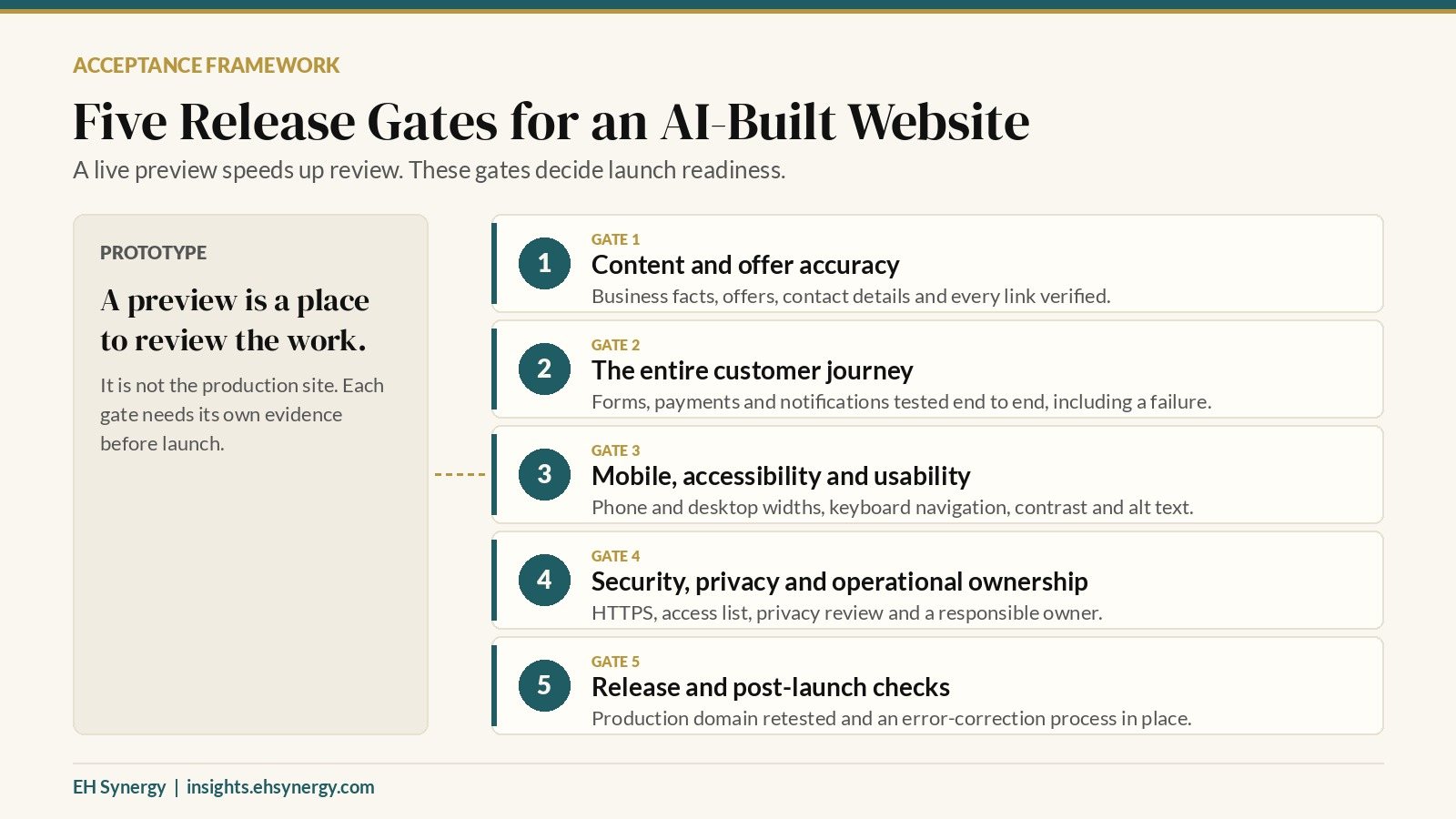
Gate 1: Content and offer accuracy
Begin with the business facts. Verify the legal business name, services, prices, package inclusions, contact information, terms, geographic coverage and calls to action.
If the website advertises a $500 introductory service, the offer description must match the actual scope and the checkout or inquiry process. A generated page should not quietly add features, testimonials, guarantees or customer results that were never authorized.
Test every visible link. Read the mobile version. Ask someone unfamiliar with the business what they think is being sold and what happens after they click the main button.
Acceptance evidence: approved page copy, verified offer details and a complete link audit.
Gate 2: The entire customer journey
A beautiful contact form is not useful if submissions go nowhere.
For an inquiry-based site, submit a test request and verify that it reaches the correct CRM, is associated with the correct contact, triggers only intended notifications and displays an accurate confirmation. Test missing required fields and invalid email formats.
For an ecommerce experience, use an approved test payment environment. Check pricing, tax and shipping assumptions where applicable, order confirmation, error states and refund information. Never use real customer data for casual testing.
Acceptance evidence: a recorded test path from entry page through completion, including a failure case.
Gate 3: Mobile, accessibility and usability
Review the site at common phone and desktop widths. Check that navigation, buttons and forms remain usable without awkward scrolling or hidden text.
Keyboard navigation, visible focus, meaningful image alt text, color contrast and readable headings deserve attention. Automated accessibility tools can help identify issues, but they cannot replace manual review.
Ask whether the page is understandable without animations and whether important information is available to someone using assistive technology.
Acceptance evidence: responsive screenshots, keyboard test notes and a prioritized defect list.
Gate 4: Security, privacy and operational ownership
Verify that the live site uses appropriate HTTPS, that form submissions are handled according to the business's privacy commitments, and that only authorized people have access to the CRM, hosting and administrative tools.
If AI-generated code is involved, review dependencies, secrets, external scripts and permissions. A prototype running in an isolated session is not proof that the deployed version is secure.
AWS explicitly notes that Session endpoints require credentials and are scoped to a runtime session. Its walkthrough also distinguishes that preview route from production deployment. AWS source
Acceptance evidence: approved deployment account, access list, privacy review and a responsible owner for updates.
Gate 5: Release and post-launch checks
Before publishing, define the final approved version. Test the actual production domain after deployment, not only the preview. Recheck the primary form or purchase flow, analytics configuration, mobile experience and redirects.
Set a process for correcting errors. Decide who maintains content, updates plugins or dependencies, monitors broken forms and receives customer reports.
Acceptance evidence: signed-off release checklist and post-launch contact.
A hypothetical example: one-page service website
Suppose a local business commissions a one-page site with a service description and an inquiry form. The prototype looks good after two rounds of AI-assisted edits.
The release should still be held if the form sends leads to the wrong pipeline, if the mobile CTA is obscured, or if the service description promises an appointment that the business does not actually provide.
Those are not cosmetic issues. They affect whether the website can perform its job.
A faster preview cycle makes them easier to discover earlier. It does not make them less important.
A decision framework for the next revision
Classify feedback into three groups: essential defects that block launch, important improvements that can be scheduled, and aesthetic preferences that should be evaluated against brand goals.
This prevents a team from endlessly changing fonts while overlooking a broken inquiry flow.
An AI-built website is ready when the customer journey is tested, the business information is correct, the responsible owners are identified and the production environment has been checked. A visually impressive demo alone is not the standard.
Where EH Synergy fits
EH Synergy approaches AI-assisted websites as business systems, not just screens. An AI Opportunity & Transformation Assessment can help determine which customer workflows need automation, which integrations are essential, and where review or human oversight belongs.
For a conversation about an assessment or website workflow, visit https://ehsynergy.com.
Primary source: AWS, October 30, 2026: https://aws.amazon.com/blogs/machine-learning/preview-web-apps-live-as-your-coding-agent-builds-them-with-amazon-bedrock-agentcore-runtime/